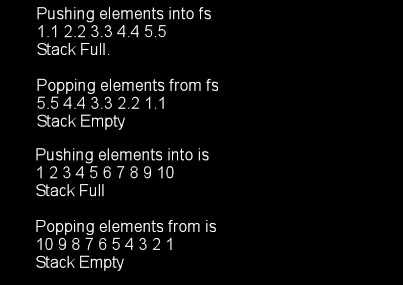
The output from the above example
#includeExample: Bubble Sortusing namespace std ; //------------------------------------------------------------- //max returns the maximum of the two elements //------------------------------------------------------------- template <class T> T max(T a, T b) { return a > b ? a : b ; } void main() { cout << "max(10, 15) = " << max(10, 15) << endl ; cout << "max('k', 's') = " << max('k', 's') << endl ; cout << "max(10.1, 15.2) = " << max(10.1, 15.2) << endl ; }
/******************************************/
/* BubbleSort()                           */
/* Requires that the operators > and = are*/
/*    overloaded for class T.             */
/******************************************/
template <class T, int>
void BubbleSort(T DataArray[], int count)
{
    int    i, j;
    T      temp;

    for(i=0; i<count; i++)
        for(j=0; j<(count-i - 1); j++)
        {
            if(DataArray[j] > DataArray[j+1])
            {
                 temp = DataArray[j];
                 DataArray[j] = DataArray[j+1];
                 DataArray[j+1] = temp;
            }
        }
}
//--------------------------------------------------------
// StackTemplate.h - A generic stack class
//--------------------------------------------------------
#ifndef STACKTEMPLATE_H
#define STACKTEMPLATE_H
template <class T>
class Stack
{
public:
    Stack(int = 10) ;// Default size = 10
    ~Stack() { delete [] stackPtr ; }
    bool push(const T&);
    bool pop(T&) ;
    bool isEmpty()const { return top == -1 ; }
    bool isFull() const { return top == size - 1 ; }
private:
    int size ;  // number of elements on Stack.
    int top ;
    T* stackPtr ;
} ;

// Constructor with the default size 10
template <class T>
Stack<T>::Stack(int s)
{
    size = ((s > 0) && (s < 1000)) ? s : 10 ;
    top = -1 ;  // initialize stack
    stackPtr = new T[size] ;
}
// push an element onto the Stack
template <class T>
bool Stack<T>::push(const T& item)
{
    if (!isFull())
    {
        stackPtr[++top] = item ;
        return 1 ;  // push successful
    }
    return 0 ;  // push unsuccessful
}

// pop an element off the Stack
template <class T>
bool Stack<T>::pop(T& popValue)
{
    if (!isEmpty())
    {
        popValue = stackPtr[top--] ;
        return 1 ;  // pop successful
    }
    return 0 ;  // pop unsuccessful
}
#include <iostream>
#include "Stack.h"
using namespace std ;
void main()
{
    typedef Stack<float> FloatStack ;
    typedef Stack<int> IntStack ;

    FloatStack fs(5) ;
    float f = 1.1 ;
    cout << "Pushing elements onto fs" << endl ;
    while (fs.push(f))
    {
        cout << f << ' ' ;
        f += 1.1 ;
    }
    cout << endl << "Stack Full." << endl
        << endl << "Popping elements from fs" << endl ;
    while (fs.pop(f))
        cout << f << ' ' ;
    cout << endl << "Stack Empty" << endl ;
    cout << endl ;

    IntStack is ;
    int i = 1.1 ;
    cout << "Pushing elements onto is" << endl ;
    while (is.push(i))
    {
        cout << i << ' ' ;
        i += 1 ;
    }
    cout << endl << "Stack Full" << endl
        << endl << "Popping elements from is" << endl ;
    while (is.pop(i))
        cout << i << ' ' ;
    cout << endl << "Stack Empty" << endl ;
}
Historic Notes |
|
	int x = 5;		// Create an int pointer
	void *vptr;		// Create a pointer with no type associated with it
	vptr = reinterpret_cast(&x);// Cast address of an int to a void pointer
	*(reinterpret_cast (vptr)) = 10; // Cast vptr to an int pointer to change x
	void (*funcPtr)(int);     // Declare a function pointer
	funcPtr = myFunction;     // Set the pointer to myFunction
	funcPtr(255);             // Call the function using the pointer
The implication here is that with templates you can pass into a function a pointer to another function which it can then call. For example using the BubbleSort function given above:
	myClass array[50];
	void (*sort)(myClass[], int);
	sort = BubbleSort;
	sortMyClass(array, sort, 50);  // pass the sort function

	template <Class T>
	void sortMyClass (myClass *arr, int count, (void (*fp)(T [], int)))
	{
	    fp(arr, count);
	}

	vector<double>dVec;             // empty vector to hold doubles
	vector<int>iVec(5,0);           // int vector of 5 elements all initialized to 0
	vector<float>fVec(20);          // float vector of 20 elements
	vector<string>sVec(10, "abc");  // string vector of 10 elements all set to “abc”
	vector<simple>simVec();         // empty vector to hold struct simple
Overloaded operators
[]Functions
#include <iostream>
#include <vector>
#include <algorithm>
#include <string>

using namespace std;
int main(int argc, char **argv)
{
   vector<string> SS;

   cout << "Creating string vector and adding 3 strings.\n";
   SS.push_back("The number is 10");
   SS.push_back("The number is 20");
   SS.push_back("The number is 30");

   cout << "Loop by index:" << endl;

   unsigned int i;
   for(i=0; i < SS.size(); i++)
   {
      cout << SS[i] << endl;
   }

   cout << endl << "Loop by Forward Iterator:" << endl;

   for(vector<string>::const_iterator cii = SS.begin(); cii != SS.end(); cii++)
   {
      cout << *cii << endl;
   }
   // FYI: A const_iterator can be used to iterate through the entire vector but
   //      prevents modifying any item in the vector.

   cout << endl << "Loop by Reverse Iterator:" << endl;

   for(vector<string>::reverse_iterator rii = SS.rbegin(); rii != SS.rend(); rii++)
   {
      cout << *rii << endl;
   }

   cout << "\nInformation on the vector:\n";
   cout << "\tsize = " << SS.size() << endl;
   cout << "\tcapacity = " << SS.capacity() << endl;
   cout << "\tmax_size = " << SS.max_size() << endl;

   cout << "\tSS[0] = " << SS[0] << endl;
   cout << "\tSS[2] = " << SS[2] << endl << endl;

   // Demonstration of a template function
   cout << "Calling swap(SS[0], SS[2]);\n";
   swap(SS[0], SS[2]);
   cout << "\tSS[0] = " << SS[0] << endl;
   cout << "\tSS[2] = " << SS[2] << endl << endl;

   SS[0] = "Can I do this?";
   cout << "SS[0] = " << SS[0] << endl;
	return 0;
}
	list <double>dList;       // empty list to hold doubles
	list <char>cList ();      // empty list to hold characters
	list <simple>simList ();  // empty list to hold struct simple
Functions
#include <iostream>
#include <list>
#include <string>

using namespace std;
int main(int argc, char **argv)
{
    list <int> L;

    cout << "Demonstrating push_back, push_front, and insert in a list.\n\n";
    L.push_back(1);             // Insert a new element at the end
    L.push_front(3);            // Insert a new element at the beginning
    L.insert(++L.begin(), 2);   // Insert "2" before position of first argument
    L.push_front(4);			// Insert a new element at the beginning
    L.push_back(5);				// Insert a new element at the end
    L.push_back(6);				// Insert a new element at the end

    cout << "Elements in the list (in order):\n\t";
    for(list<int>::iterator i=L.begin(); i != L.end(); ++i) cout << *i << " ";
    cout << endl << endl;

    cout << "Information on the list:\n";
    cout << "\tsize = " << L.size() << endl;
    cout << "\tmax_size = " << L.max_size() << endl << endl;

    cout << "Sorting the list:\n";
    L.sort();
    cout << "Elements in the list (in order):\n\t";
    for(i=L.begin(); i != L.end(); ++i) cout << *i << " ";
    cout << endl << endl;

    cout << "Demonstrating pop_back, pop_front, and remove from a list.\n";
    L.pop_back();           // Remove element at the end
    L.pop_front();          // Remove element at the beginning
    L.remove(3);			// Remove element from middle
    cout << "Elements in the list (in order):\n\t";
    for(i=L.begin(); i != L.end(); ++i) cout << *i << " ";
    cout << endl << endl;

    cout << "Demonstrating erase() to remove all but two elements.\n";
    L.erase(++L.begin(), --L.end());
    cout << "Elements in the list:\n\t";
    for(i=L.begin(); i != L.end(); ++i) cout << *i << " ";
    cout << endl << endl;

    cout < "Demonstrating assign(5, 2) to put five 2s in the list.\n";
    L.assign(5, 2);
    cout << "Elements in the list:\n\t";
    for(i=L.begin(); i != L.end(); ++i) cout << *i << " ";
    cout << endl << endl;

    return 0;
}
	deque<double>dDeque;       // empty deque to hold doubles
	deque <char>cDeque ();     // empty deque to hold characters
	deque <simple>simDeque (); // empty deque to hold struct simple
Overloaded operators
[]Functions
#include <iostream>
#include <deque>
#include <algorithm>
#include <string>

using namespace std;
int main(int argc, char **argv)
{
   deque<string> DD;

   cout << "Creating string deque and adding 3 strings using push_front.\n";
   DD.push_front("Deque the halls 1");
   DD.push_front("Deque the halls 2");
   DD.push_front("Deque the halls 3");

   cout << "Creating string deque and adding 3 strings using push_back.\n\n";
   DD.push_back("Deque the halls 4");
   DD.push_back("Deque the halls 5");
   DD.push_back("Deque the halls 6");

   cout << "Loop by index:" << endl;

   unsigned int i;
   for(i=0; i < DD.size(); i++)
   {
      cout << DD[i] << endl;
   }

   cout << endl << "Constant Iterator:" << endl;

   for(deque<string>::const_iterator=DD.begin(); cii!=DD.end(); cii++)
   {
      cout << *cii << endl;
   }
   // FYI: A const_iterator can be used to iterate through the entire deque but
   //      prevents modifying any item in the deque.

   cout << endl << "Reverse Iterator:" << endl;

   for(deque<string>::reverse_iterator rii=DD.rbegin(); rii!=DD.rend(); rii++)
   {
      cout << *rii << endl;
   }

   cout << "Information on the vector:\n";
   cout << "\tsize = " << DD.size() << endl;
   cout << "\tmax_size = " << DD.max_size() << endl;
   cout << "\tDD[0] = " << DD[0] << endl;
   cout << "\tDD[2] = " << DD[2] << endl << endl;
   cout << "Calling swap(DD[0], DD[2]);\n";
   swap(DD[0], DD[2]);
   cout << "\tDD[0] = " << DD[0] << endl;
   cout << "\tDD[2] = " << DD[2] << endl << endl;

   return 0;
}
Do you begin to see some commonality among these templates? There is an attempt to create a common
interface within the limits of what each is supposed to do, e.g. list does not use the [ ]
operator because a list does not allow random access.
	set<char> cSet;                      // Set of characters
	int iArr[] = {5, 10, 25, 50, 100};
	set<int> iSet(iArr, iArr+5);         // Set of ints built from iArr
	                                        // using pointers to the first and last
	                                        // elements as iterators.
	bool simpleLessThan(simple *s1, simple *s2)
	{
	    return s1->X < s2->X;
	}
	// Set of simple with a given function to do "less than"
	set<simple, bool(*)(simple *, simple *)> sSet(simpleLessThan);
Overloaded operatorsMust overload < or provide a "less than" comparison functionFunctions
#include <iostream>
#include <set>
#include <algorithm>
#include <string>

using namespace std;

// Simple structure
struct simple
{
	int X;
	char ch;
};

// Comparator function for set demo using X field of a struct simple
bool simpleLessThan(const simple &s1, const simple &s2)
{
	return s1.X < s2.X;
}

int main(int argc, char **argv)
{
	// Create an empty set of characters
	set<char> cSet1;
	set<char> cSet2;
	set<char> cSet3;

	cout << "Creating char set 1 and adding 10 characters.\n";
	for(char c = 'A'; c < 'K'; c++)
	{
		cSet1.insert(c);
	}
	cout << "Printing contents of char set 1 using iterators begin and end.\n\t";
	for(set<char>::iterator itr = cSet1.begin(); itr != cSet1.end(); itr++)
	{
		cout << *itr << " ";
	}
	cout << "\nInformation on cSet1:\n";
	cout << "\tsize = " << cSet1.size() << endl;
	cout << "\tmax_size = " << cSet1.max_size() << endl;
	cout << "\tcount = " << cSet1.count('A') << endl;
	cout << "Demonstrating find function on cSet1\n";
	char ch = 'C';
	set<char>::const_iterator cItr;
     // FYI: A const_iterator can be used to iterate through the entire set but
     //      prevents modifying any item in the set.
	cItr = cSet1.find(ch);
	cout << "\tfind('C') returned iterator to " << *cItr;
	cout << "\n\n";

	cout << "Creating char set 2 and adding 10 characters.\n";
	for(char c = 'E'; c < 'N'; c++)
	{
		cSet2.insert(c);
	}
	cout << "Printing contents of char set 2 using iterators begin and end.\n\t";
	for(set<char>::iterator itr = cSet2.begin(); itr != cSet2.end(); itr++)
	{
		cout << *itr << " ";
	}

	cout << "\n\nCreating char set 3 as a unnion of cSet1 and cSet2.\n";
	insert_iterator<set<char>>unionItr(cSet3, cSet3.begin()); // iterator for result
	set_union(cSet1.begin(), cSet1.end(), cSet2.begin(), cSet2.end(), unionItr);
	cout << "Printing contents of char set 3 using iterators begin and end.\n\t";
	for(set<char>::iterator itr = cSet3.begin(); itr != cSet3.end(); itr++)
	{
		cout << *itr << " ";
	}

	cout << "\n\nClearing set 3\n";
	cout << "Refilling set 3 as an intersection of cSet1 and cSet2.\n";
	cSet3.clear();
	insert_iterator<set<char>>intersectionItr(cSet3, cSet3.begin()); // iterator for result
	set_intersection(cSet1.begin(), cSet1.end(), cSet2.begin(), cSet2.end(), intersectionItr);
	cout << "Printing contents of char set 3 using iterators begin and end.\n\t";
	for(set<char>::iterator itr = cSet3.begin(); itr != cSet3.end(); itr++)
	{
		cout << *itr << " ";
	}
	cout << "\n\n";

	cout << "\n\nClearing set 3\n";
	cout << "Refilling set 3 as the difference of cSet1 and cSet2.\n";
	cSet3.clear();
	insert_iterator<set<char>>diffItr(cSet3, cSet3.begin()); // iterator for result
	set_difference(cSet1.begin(), cSet1.end(), cSet2.begin(), cSet2.end(), diffItr);
	cout << "Printing contents of char set 3 using iterators begin and end.\n\t";
	for(set<char>::iterator itr = cSet3.begin(); itr != cSet3.end(); itr++)
	{
		cout << *itr << " ";
	}
	cout << "\n\n";

	cout << "\n\nClearing set 3\n";
	cout << "Refilling set 3 as the symmetric difference of cSet1 and cSet2.\n";
	cSet3.clear();
	insert_iterator<set<char>>symDiffItr(cSet3, cSet3.begin()); // iterator for result
	set_symmetric_difference(cSet1.begin(), cSet1.end(), cSet2.begin(), cSet2.end(), symDiffItr);
	cout << "Printing contents of char set 3 using iterators begin and end.\n\t";
	for(set<char>::iterator itr = cSet3.begin(); itr != cSet3.end(); itr++)
	{
		cout << *itr << " ";
	}
	cout << "\n\n";

	// Create a set of 5 ints from an array of ints by giving the
	//   iterators for begin and end
	int iArr[] = {5, 10, 25, 50, 100};
	set<int> iSet(iArr, iArr+5);

	// Create a set of struct simple with a required function to do "less than" comparison
	set<simple, bool(*)(const simple &, const simple &)> sSet(simpleLessThan);


	cout << "Creating int set and initializing to {5, 10, 25, 50, 100}.\n";
	cout << "Printing contents of int set using iterators begin and end.\n\t";
	for(set<int>::iterator itr = iSet.begin(); itr != iSet.end(); itr++)
	{
		cout << *itr << " ";
	}
	cout << "\n\n";

	cout << "Creating struct simple set and adding 5 elements.\n";
	for(int i=0; i<5; i++)
	{
		simple *s1 = new simple();
		s1->X = i;
		s1->ch = 'A' + i;
		cout << "\tAdding " << s1->X << ", " << s1->ch << " to the set.\n";
		sSet.insert(*s1);
	}
	cout << "Getting iterators to two elements to demonstrate < operator.\n";
	set<simple, bool(*)(const simple &, const simple &)>::iterator simItr1 = sSet.begin();

	set<simple, bool(*)(const simple &, const simple &)>::iterator simItr2 = sSet.begin();
	simItr2++;
	simItr2++;
	cout << "Comparing simItr1 = " << simItr1->X << ", " << simItr1->ch << endl;
	cout << "    with  simItr2 = " << simItr2->X << ", " << simItr2->ch << endl;
	if(simpleLessThan(*simItr1, *simItr2))
		cout << "simItr1 is less than simItr2" << endl;
	else
		cout << "simItr1 is greater than simItr2" << endl;
	cout << "Printing contents of struct set using iterators begin and end.\n";
	for(simItr1 = sSet.begin(); simItr1 != sSet.end(); simItr1++)
	{
		cout << "\tStruct = " << simItr1->X << ", " << simItr1->ch << endl;
	}

	return 0;
}
	map<int, string> Employees;  // Create map of strings keyed on int
	multimap<string, int> m;     // Create multimap of ints keyed on string
Overloaded operators
	Must overload < or provide a less than comparison function
	[ ] – overloaded for insertion
Functions
#include <iostream>
#include <map>
#include <algorithm>
#include <string>
#include <utility>

using namespace std;

int main()
{
   map<int, string> Employees;

   //---------------------------------------------------------------------
   //                      Demonstrate map template
   //---------------------------------------------------------------------
   // Assignment using array index notation
   cout << "Creating map<int, string> Employees and adding 5 members\n";
   Employees[5234] = "Mike C.";
   Employees[3374] = "Charlie M.";
   Employees[1923] = "David D.";
   Employees[7582] = "John A.";
   Employees[5328] = "Peter Q.";

   // Print using iterator
   cout << "Printing all members using iterators through the pair objects\n";
   for( map<int,string>::iterator ii=Employees.begin(); ii!=Employees.end(); ++ii)
   {
       cout << "\t" <<(*ii).first << ": " << (*ii).second << endl;
   }

   cout << "\nPrinting all members using their index notation\n";
   cout << "\tEmployees[5234]=" << Employees[5234] << endl;
   cout << "\tEmployees[3374]=" << Employees[3374] << endl;
   cout << "\tEmployees[1923]=" << Employees[1923] << endl;
   cout << "\tEmployees[7582]=" << Employees[7582] << endl;
   cout << "\tEmployees[5328]=" << Employees[5328] << endl << endl;

   cout << "Using find to locate an element with Employees.find(3374)\n";
   cout << "  Note: find returns a pair object.\n";
   map<int, string>::iterator itr = Employees.find(3374);
   cout << "\tFound:  [" << (*itr).first << ", " << (*itr).second << "]" << endl << endl;

   cout << "Information on the map:\n";
   cout << "\tsize = " << Employees.size() << endl;
   cout << "\tmax_size = " << Employees.max_size() << endl << endl;

   //---------------------------------------------------------------------
   //                      Demonstrate map template
   //---------------------------------------------------------------------
   // Compare (<) function not required since it is built into string class.
   // else declaration of a comparison function would have to be included
   // in the multimap definition i.e. multimap<string, int, compare> m;

   cout << "Creating multimap<string, int> m and adding 6 members\n";

   multimap<string, int> m;

   m.insert(pair<string, int>("a", 1));
   m.insert(pair<string, int>("c", 2));
   m.insert(pair<string, int>("b", 3));
   m.insert(pair<string, int>("b", 4));
   m.insert(pair<string, int>("a", 5));
   m.insert(pair<string, int>("b", 6));

   cout << "Number of elements with key a: " << m.count("a") << endl;
   cout << "Number of elements with key b: " << m.count("b") << endl;
   cout << "Number of elements with key c: " << m.count("c") << endl;

  cout << "Elements in m: " << endl;
  for (multimap<string, int>::iterator it = m.begin(); it != m.end(); it++)
   {
       cout << "\t  [" << (*it).first << ", " << (*it).second << "]" << endl;
   }

   pair<multimap<string, int>::iterator, multimap<string, int>::iterator> ppp;

   // equal_range(b) returns pair<iterator,iterator> representing the range
   // of element with key b
   ppp = m.equal_range("b");

   // Loop through range of maps of key "b"
   cout << endl << "Range of \"b\" elements:" << endl;
   for (multimap<string, int>::iterator it2 = ppp.first; it2 != ppp.second; it2++)
   {
       cout << "  [" << (*it2).first << ", " << (*it2).second << "]" << endl;
   }
}
stack<dataType> myStack;This will create a list template of dataType objects and then place the list inside of a stack so you get the push and pop actions required of a stack.
#include <iostream>
#include <stack>

using namespace std;

int main()
{
	stack<int> iStack;
	int val;

	// Push some stuff on the int stack
	cout << "Creating an int stack and pushing 10 values on it.\n\n";
	for(int i=0; i<10; i++)
	{
		val = i * 100;
		iStack.push(val);
	}
	cout << "Printing stack.top then popping values from the stack.\n\t ";
	while(!iStack.empty())
	{
		cout << iStack.top() << " ";
		iStack.pop();
	}
	if(iStack.empty())
		cout << "\n\nStack is now empty.\n";
	else
		cout << "\n\nOops! Why isn't the stack empty?\n"; // Won't happen
	cout << "\n\n";
}
queue<dataType> myQueue;This will create a list template of dataType objects and then place the list inside of a queue so you get the push and pop actions of a queue.
#include <iostream>
#include <queue>
#include <list>

using namespace std;

int main()
{
	queue<char> cQueue;

	// Push some stuff on the char queue
	cout << "Creating a char queue and pushing 10 values on it.\n\n";
	for(char i='A'; i<'K'; i++)
	{
		cQueue.push(i);
	}
	cout << "\tQueue.front = " << cQueue.front() << endl;
	cout << "\tQueue.back = " << cQueue.back() << endl << endl;

	cout << "Printing queue.front then popping values from the queue.\n\t ";
	while(!cQueue.empty())
	{
		cout << cQueue.front() << " ";
		cQueue.pop();
	}
	if(cQueue.empty())
		cout << "\n\nQueue is now empty.\n";
	else
		cout << "\n\nOops! Why isn't the queue empty?\n"; // Won't happen
	cout << "\n\n";
}
priority_queue<dataType> myPQueue;This will create a list template of dataType objects and then place the list inside of a priority_queue so you get the push and pop actions of a queue.
#include <iostream>
#include <queue>
#include <list>

using namespace std;

int main()
{
	priority_queue<int>piQueue;
	int val;

	// Push some stuff on the int queue
	cout << "Creating an int priority_queue and pushing 10 values on it.\n";
	cout << "  Values are pushed from smallest to largest.\n\n";
	for(int i=0; i<10; i++)
	{
		val = i * 100;
		piQueue.push(val);
	}
	cout << "\tpiQueue.top = " << piQueue.top() << endl << endl;

	cout << "Printing queue.top then popping values from the queue.\n";
	cout << "   Items popped from largest to smallest.\n\n\t ";
	while(!piQueue.empty())
	{
		cout << piQueue.top() << " ";
		piQueue.pop();
	}
	if(piQueue.empty())
		cout << "\n\nQueue is now empty.\n";
	else
		cout << "\n\nOops! Why isn't the queue empty?\n"; // Won't happen
	cout << "\n\n";
}