Strings
String Objects in C++
A string is a special data type in C++. It is a "string" of characters (pun intended)
in quotes. For example:
"This is a string."
Many programmers, however, maintain that there is no string data type in the
C/C++ programming language. If they are referring to the basic or atomic data types
like int, double, etc. then they are right. The string object discussed here is a
part of a special C++ library known as the Standard Template Library.
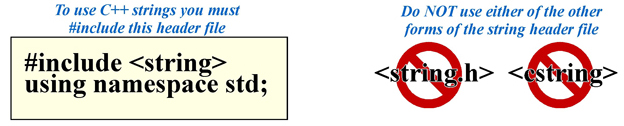
Below is a simple example of creating and using string objects:
	#include <iostream>	// Needed for the cout operator
	#include <string>	// Needed for the string object
	using namespace std;

	string bookTitle;	// Declare three variables of type string
	string phrase1;
	string phrase2;

	int main()
	{
	     // Store some strings of characters in these string objects
	     phrase1 = "Programming and ";
	     phrase2 = "Problem Solving";
	     bookTitle = phrase1 + phrase2;  // Adding strings is called concatenation

	     // Now print the strings
	     cout << phrase1 << phrase2 << endl;
	     cout << bookTitle << endl;

	     return 0;
	}
The output of this simple program looks like this:

The Backslash (\) Operator in Strings
When used in strings the backslash character serves a special purpose. It is call an
escape code or escape sequence. It is used to place certain
special characters which cannot be typed at the keyboard directly (extended ASCII character
set) or characters which would have special meaning to the operating system if you tryed
to type them directly from the keyboard (characters typed while holding down the control
key). These special characters are entered into a string by usng a backslash character
(\) followed by a particular letter or the ASCII value of the character you wish to enter
in the string. All ASCII values must be given in hexadecimal (base 16 numbering system).
Here are just a few of the more common escape sequences used:

Below is some sample code illustrating how some of these escape sequences are used.
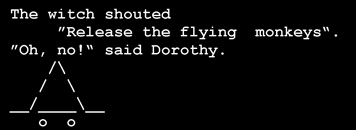
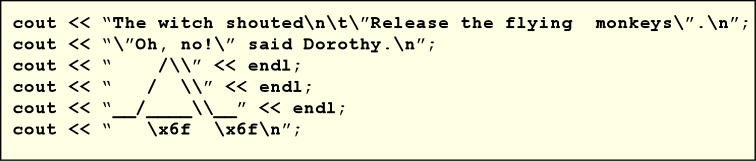 In this code the first line output, starting with "The witch..." a newline character is
inserted after the word "shouted". This is followed by a tab character then a quote
character. Another quote character is inserted after the word "monkeys" then another
newline character before the closing quote of the string.
In this code the first line output, starting with "The witch..." a newline character is
inserted after the word "shouted". This is followed by a tab character then a quote
character. Another quote character is inserted after the word "monkeys" then another
newline character before the closing quote of the string.
In the second line, again two quotes are inserted into the string around the text Oh, no!
and another newline character is placed at the end of the string.
The next several lines print forward slash, backslash, and underline characters to draw the
witch's hat. Note that to print a single backslash you must use a double backslash. The
eyes of the witch peeping out from under the had are actually just the lower case 'o'
character but printed showing how to print a character using the hexidecimal code
for that character. See the link on
hexidecimal values for ASCII characters for a listing of these values.
Below is an image showing what the display from this code looks like...